Awareness Materials
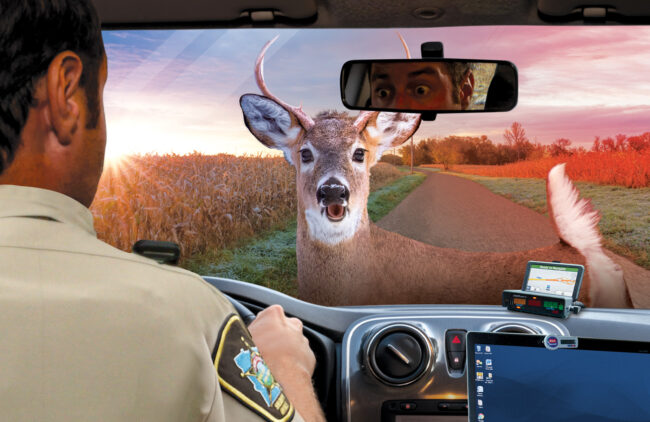
Watch for Deer, Please

Deer-vehicle Collision Prevention
Help reduce the number of employees who collide with deer while driving on the job or limit the severity of the collision by using the below awareness materials. Deer-vehicle collisions can cause major damage to autos, as well as injure occupants.
For maximum benefit, use these materials during the fall and early winter when deer are more active and deer-vehicle collisions are more frequent.
This message reminds employees to be generally alert for deer while driving, particularly during dawn and dusk.
Help prevent and lessen deer-vehicle collisions by using the below video to get employees thinking about what they can do to avoid and minimize collisions.
The video is a great way to kick off the campaign or to follow up with staff after hanging the video’s companion poster.

Place posters near workstations and high-traffic areas around the office, such as next to coffee pots, water stations and refrigerators.
Members may request to have printed materials sent to them.

The digital (jpeg) image file can be used anywhere you can insert an image, such as on the employee intranet, emails, employee newsletter, computer lock screen.
How to Share Videos
The animated videos available to MCIT members as part of MCIT’s loss control and risk management services can be shared with member employees in two ways. See instructions below.
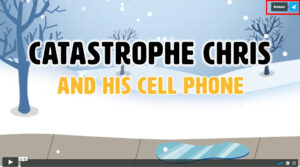 1. Locate the video you want to add to your intranet site . Click on the paper airplane icon in the upper right corner of the video.
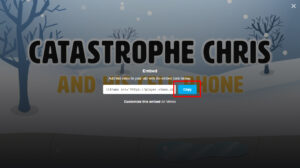 2. Click the blue “Copy” box to capture the embed code.
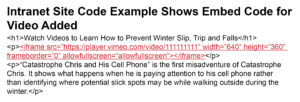 3. Paste the embed code into the code of the intranet page where you want the video to appear (see above). The embed code looks something like this: <iframe src=”https://player.vimeo.com/video/111111111” width=”640” height=”360” frameborder=”0” allowfullscreen></iframe>
This allows you to provide a link to the animated videos to employees that takes them to view the animated videos online. You could post the links on the entity’s intranet site or distribute in e-mails, for example.
Suggestion: For the most impact, hyperlink a screen shot image of the video’s title screen to increase the visual appeal.
- Follow steps 1 through 3 above for capturing the embed code.
- Paste the embed code into a text file.
- Delete extraneous text as shown here: <iframe src=”https://player.vimeo.com/video/111111111” width=”640” height=”360” frameborder=”0” allowfullscreen></iframe>
- The remaining text is the URL (link) for the video at the MCIT online player. Use the link to connect employees to the video.
Campaign Tips
- Place posters in prominent places, such as break rooms and exits
- Use the digital image creatively, such as posting to the intranet, emailing to staff, using as computer lock screen image, placing in employee newsletter or handing out at staff meetings
- Keep the message fresh: Use one topic for a few weeks then switch to another topic for a few weeks and so on
 Work Wisely Program
MCIT’s Work Wisely program helps members build and support a positive safety culture:
- Encourage each employee to become a safety advocate
- Boost the safety mindset of employees
- Improve safety behaviors
When all people of an organization embrace and value safety, the frequency and severity of workplace injuries and illnesses decrease. MCIT encourages members to Work Wisely!
Topics